October 23, 2013

[quick tip] Multiple pictures are now shown in an album (Android phone)

Posted in mysms quick tips by mysms

We love sharing our greatest moments as pictures via mysms. How about you? Until one of the latest updates, every single photo had to be opened separately to watch it full screen. So the view of multiple pics was kind of annoying for some of you. That’s why we provide you with this news 🙂

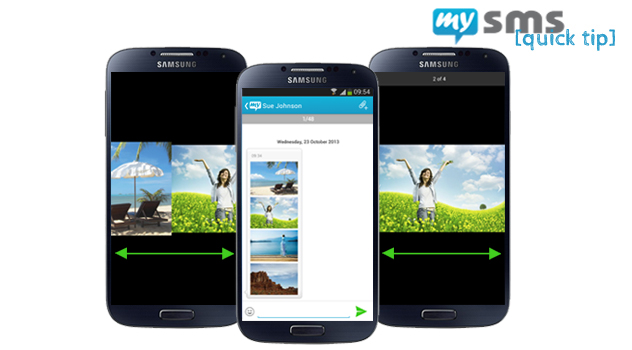
Swipe left and right to view the pics

Swipe left and right to view the pics


Showing your friends where you are and what you experience at this very moment is very easy with mysms. The cool thing is that the attachments are sent via a link. So if you send them via your mobile carrier, you will only get charged as usual for an SMS instead of an MMS.


Since one of the latest updates, multiple pictures are shown in an album on mysms for Android phone. That means you don’t need to open each file separately. Simply open one picture and swipe to the left or right to view the other ones.


We hope you like that improvement!

October 16, 2013

mysms becomes SMS & YOU in France

Posted in mysms news by mysms

Today we’re very proud to announce our partnership with B&YOU. In B&YOU, which is part of the French mobile operator Bouygues Telecom, we found a strong and innovative partner to provide their customers and our mysms users in France with the best texting experience on every platform.
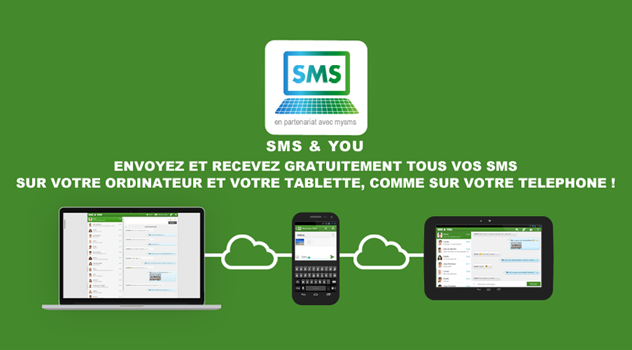
mysms becomes SMS & YOU in France

mysms becomes SMS & YOU in France


What is this all about?

During the time of our partnership only B&YOU customers and existing mysms users have the exclusive right to use our service in France. The co-branded applications of mysms are named SMS & YOU, come with a brand new design and are available for free. SMS & YOU will fully replace our actual service in all French stores.


Why have we decided to cooperate with B&YOU?

Bouygues Telecom is a global provider of mobile communications, landlines, TV, internet and cloud services. With their business division B&YOU the company serves more than 1 million customers. B&YOU shares our passion for online and loves to explore new innovative features as much as we do. As B&YOU was on a lookout on a customized solution to improve the texting experience of their customers, the partnership with mysms is the perfect match.


mysms becomes SMS & YOU – What does that mean for you?

In the last few months we have been developing a product that comes with a co-branded design and offers synchronized texting for every B&YOU user. B&YOU users can download the phone app from the links mentioned below to register for the service. After the setup and the initial sync messages can be sent and received on a tablet, desktop and via the web.

Existing mysms users need to switch to the new SMS & YOU apps on all devices. You can log in with current mysms account and all messages will also be available in the SMS & YOU apps.

At the moment the SMS & YOU apps are available for the following platforms for free (click on the links for a direct download):

– Android phone

– Android tablet

– Web app

Additionally, SMS & YOU applications for all other platforms will be added within the next few weeks.


If you have any feedback or other requests please let us know in the comments.

We’re very looking forward to the future cooperation with B&YOU and hope that you, all mysms and B&YOU users from France, share our excitement!
September 17, 2013

[quick tip] Find advanced options in the expert settings

Posted in mysms quick tips by mysms

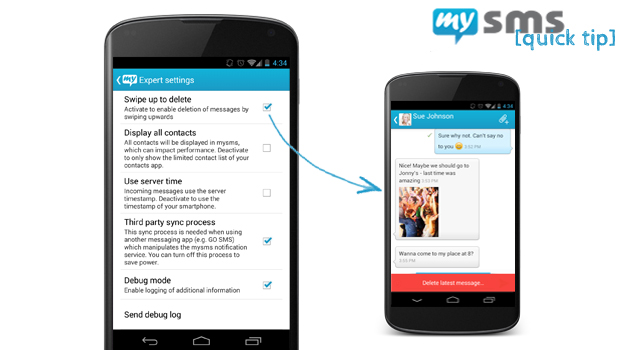
We’ve added a new section in the mysms settings, called expert settings. In today’s quick tip we will take a closer look at it. The expert settings include some options you might not use or change every day, but which can be very useful.


Expert settings & swipe to delete

Expert settings & swipe to delete

We’ll explain each feature separately:

Swipe up to delete: We know you love your texts. That’s why we save them in the cloud so that you can access them anytime and on any device. However, if you belong to the group of users who only want to keep the most important ones or if you often delete specific messages right after receiving it, you should make use of this option. After enabling it, you just need to swipe up in the message view or the pop up to delete the most recent message.

Display all contacts: Especially if you’re using mysms on your business phone, this could be useful for you. In this case your contact list probably seems endless. Until now mysms showed all your contacts saved in your contact app – no matter if they have been hidden or not. Disabling this option only displays the limited contact list of your contacts app. What a relief!

Use server timestamp for incoming messages: Always in trouble with timestamps that mix up your incoming and outgoing messages? Use this feature to either use the timestamp of the server or the one of your smartphone.


This is the situation we definitely don’t want you to be in. Anyway, the last two options are especially important if you’re experiencing issues with mysms.

Debug mode & debug log: Enabling the debug mode allows us to log some technical information of the app on your phone that helps us discovering the reason for e.g. crashes or bugs. After enabling the debug mode, please try to reproduce your issue. If it happens again, you just need to choose “send debug log”. Type in a short description of your issue and forward the email to our customer service team who will have a look at it.


You would like to see some other features in the expert settings or the mysms app in general? Well, why not posting a suggestion on our forum? Other users can give their votes for your idea.

September 3, 2013

We proudly present mysms mirror: To text from one phone to another

Posted in mysms news by mysms

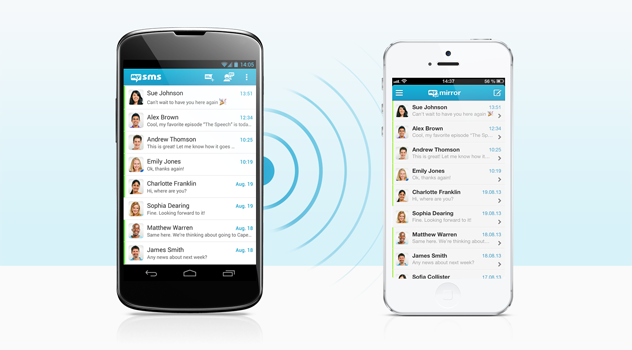
You are using two smartphones, but you hate to carry both devices with you all the time? Today we have a great announcement to make! We’re releasing a new app: mysms mirror. This app is an extension of the mysms phone app and will help you to manage the SMS conversations of your two smartphones.


mysms mirror

mysms mirror is available for Android phone and iPhone


Many of our users told us they struggle to stay on top of their messages on a daily basis when using multiple phones. If you have a look at our forum, you’ll notice that it is also the most requested feature to use mysms on two different phones (maybe you even belong to the group of voters). With this feedback in mind, we decided to find an easier way to keep track of text messages. The result is an app that concentrates on one main feature – displaying text messages from one phone to another.


mysms mirror allows you to better manage your texts when using two phones. You’ll be able to read and write messages using different phone numbers from one single smartphone. And it’s not only limited to text messages, as we’re going one step further and will add notifications for missed calls in the next version. So no matter if you are using a business and a private phone, or if you just want to save on costs by using different operators – mysms mirror will help you to simplify sending and receiving text messages. You can be sure you won’t miss an important message or call, you will always have the right phone with you.


mysms mirror is available for your Android phone or iPhone. Let’s have a look how to get started:

1) Install mysms on your Android phone or iPhone you want to mirror and create a mysms account. This will be the account that you use to mirror your texts.

2) Install mysms mirror for your Android phone or iPhone to display your messages on your primary phone and log in with your previously created or your existing mysms account.


Stay up to date with mysms mirror, if you use two or more smartphones. For Android we offer a free trial of 30 days ($9.99 for unlimited usage), so start testing right away and let us know what you think about it in the comments!


Update October 9, 2014: Starting today we are introducing a new Premium model that will be different to the Premium that we presented in this post. mysms mirror is one of many features that is included in the newly introduced Premium offer. Find more information about mysms Premium here.

June 20, 2013

Give mysms a wooden look (Android phone)

Posted in mysms news by mysms

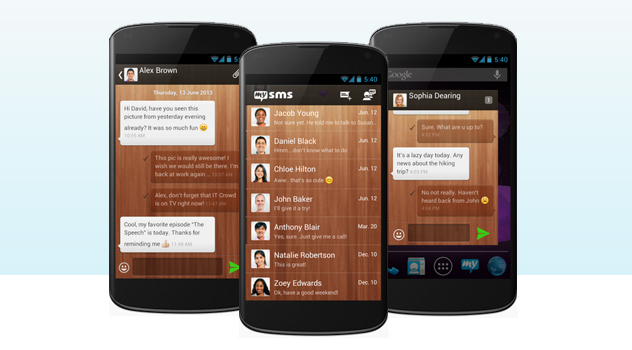
Can you remember the theme voting we had a few weeks ago? The Chrome theme won, closely followed by the wooden theme. Some of you wished the Wooden Theme to be implemented as well, therefore it’s time to announce this news: mysms – Wooden Theme is available in the Google Play Store.

Personalize your mysms app

Personalize your mysms app

The use of the wooden theme is another great possibility to personalize your mysms app. It let’s your mysms app shine in a picturesque look on your Android phone. AND it is for FREE 🙂


We assume you know it already, but we’ve got other great looking themes for your Android phone:


As a reminder, here’s how to use the themes:

  • Click on Menu to open the mysms settings
  • Choose the submenu “Theme” (under “other settings”)
  • Select “Find more themes” to open the available mysms themes in the Google Play Store
  • Install your favorite one
  • Go back to mysms and open the submenu “Theme” again
  • Now you can choose from the themes you’ve downloaded recently


Download it from this link and let us know what you think in the store reviews!